



Everglades Depth Estimation Network (EDEN) for Support of Biological and Ecological Assessments
| Important Information |
|---|
|
The TransectPlotter has been modified to run on 64-bit machines. Please see installation instructions below for more information. The "stations.txt" file (needed to run the TransectPlotter) has also be updated to include to include the current (2013) version of EDEN gages. The new file has been zipped up with both the 32-bit and 64-bit programs. |
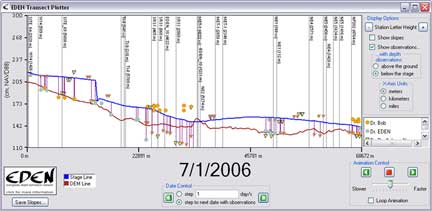
EDEN TransectPlotter is a program for plotting daily water level surfaces and ground elevation profiles for user-specified transects across the Everglades. The water surface can be animated over a user-specified time period and the water surface slope is calculated and displayed along the transect for user-specified distances.
Location of nearby water level gaging stations can be indicated on the transect plot. The location of the gage in meters perpendicular to the transect line provides users with information about data that may have been used in development of the transect plot. The daily median output files must be reviewed to determine if gage data were available for the period of interest.
Additionally, user-provided observations of water level and water depth can be plotted on the transect for comparison with the EDEN water surface. The user-specified distance perpendicular to the transect identifies a selection criteria for observations that are plotted on the transect plot.
All water level and ground elevation data are output in units of North American Vertical Datum of 1988 (NAVD88).
| Installation |
|---|
|
You will need the following files: Required for execution of the program: (Note: if you previously installed other EDENapp tools, then you may have some or all of these items already installed)
Required User Input Files:
User's Guide (pdf, 545 KB - updated September 10, 2013) Notes:
|
| We're looking for feedback! Please contact us. |
The EDENapps are no longer available on CERPZone. Java-based versions of EDENapps are downloadable at: http://sofia.usgs.gov/eden/edenapps/index.php
