



Everglades Depth Estimation Network (EDEN) for Support of Biological and Ecological Assessments
| Important Information |
|---|
|
Update: Version 2.2.0 is now available (February 2013), for PC (Mac coming soon). See installation information below.
|
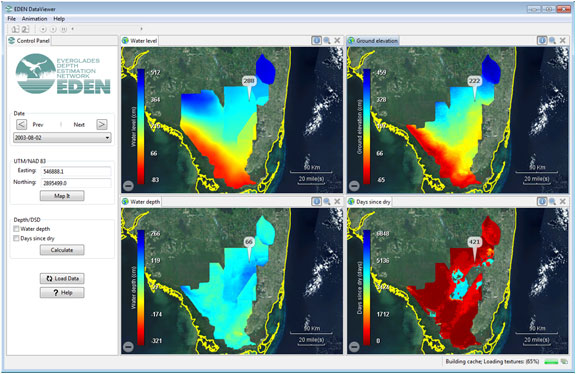
The EDEN DataViewer is a program for viewing the daily EDEN surfaces of water level and ground elevation from the ground surface digital elevation model and creates daily surfaces of water depth and days since last dry. The user can view all or a selected area of the EDEN domain and the surfaces can be animated over time. Data values for each surface are reported for user-selected UTM-coordinate locations.
| Installation |
|---|
|
Prior versions of the DataViewer required the user to download NetCDF .dll files and the .NET Framework. This is no longer required, as the latest version of the DataViewer is Java-based. All necessary files are included in the zip file (see below), except for the Java installation. Users will need to have 32-bit Java Virtual Machine (JVM) installed on their system before they can run the DataViewer. The 64-bit JVM causes issues with the DataViewer, so if you are running a 64-bit system, please ensure you have the 32-bit JVM installed, not the 64-bit one. Please contact us if you have questions. User's Guide (pdf, 738 KB, updated February 16, 2013) You will need the following files:
Required User Input Files:
|
| We're looking for feedback! Please contact us. |
The EDENapps are no longer available on CERPZone. Java-based versions of EDENapps are downloadable at: http://sofia.usgs.gov/eden/edenapps/index.php
